Already downgraded
The file matches the clean target. It does not need another patch.
How to convert a supported Steam installation to v1.0 US, install mods, and set up multiplayer on Windows, Linux, or Steam Deck.
Supports NewSteam R2 Global and produces v1.0 US (Hoodlum).
Close the game first. You can leave Steam open.
Use the regular online build for most installations. Choose the offline package when the computer has a slow or unreliable connection; it already contains the large downgrade patches. Mod downloads still need internet access.
The app normally finds Steam automatically. If it does not, choose the folder containing gta_sa.exe or gta-sa.exe. Do not select the Steam library root.
Press Scan. The header should identify the version and say whether the directory is writable. The file table explains which files can be patched.
Tick the fixes you want. The default selection is a sensible starting point. You can change or install mods later without running the downgrade again.
Press Downgrade game + selected mods and let the operation finish. If Steam Deck or Linux shows a launch option afterward, copy it into the game's Steam properties.
The window keeps the decision-making information visible: detected version at the top, optional mods in the middle, exact file results in the table, and the current job at the bottom.
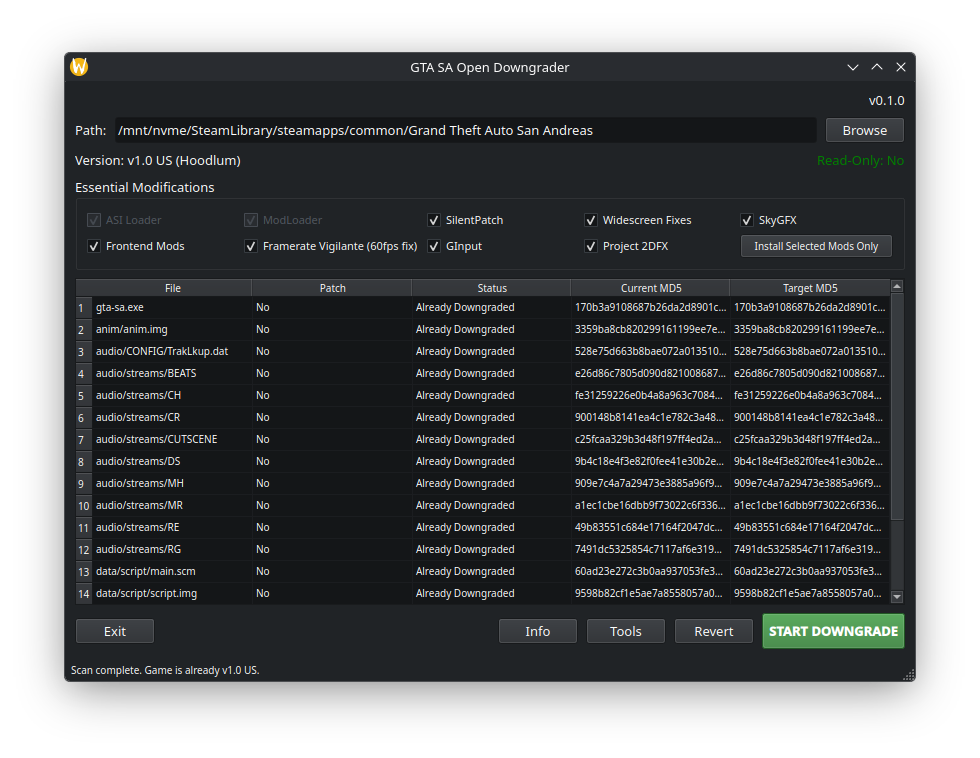
The file matches the clean target. It does not need another patch.
The file matches the supported Steam source and has a patch ready.
The file differs from the known source. The app may try it, but it accepts the result only if the final hash is exact.
A required source file is absent. Restore it through Steam or use a known complete installation.
Each checkbox represents a curated package. The app downloads its upstream archive, normalizes the folder layout, and records the installed version so later scans can show updates.
Some file hosts show anti-bot pages instead of the archive. Download the official package in your browser, then use Tools → Import mod archive. The app still validates the archive layout before installing it.
SALtd Russian uses the manual ZIP edition of SanLtd Team 0.56. The old installer, executable readme, and translated intro videos are deliberately excluded.
The first original copy of every changed game file is kept in the game's backups folder. Repeating the downgrade does not replace that original backup.
Open Tools and choose the restore action. It returns recorded game files to their first saved state.
Use this only after you have launched and checked the game. Deletion requires confirmation and cannot be undone.
Press the information button at the bottom-right. The full session journal can be copied or exported as a .log file for a bug report.
Restoring the game backup does not uninstall mods. Use the mod or multiplayer removal actions for those components.
The AppImage is portable. Mark it executable and run it. If a system cannot mount AppImages, use its extraction fallback:
./gtasa-open-downgrader-linux.AppImage --appimage-extract-and-runAfter installing ASI Loader, put this in Steam → GTA San Andreas → Properties → Launch Options:
WINEDLLOVERRIDES="vorbisFile=n,b" %command%The app uses the same Steam library, Proton build, and compatibility prefix already selected for GTA San Andreas. It does not create a second Wine prefix or call system Wine.
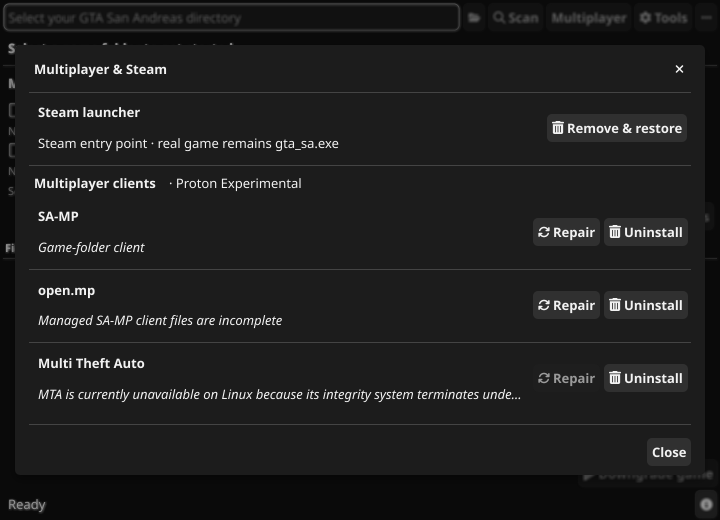
Scan the game, open Multiplayer, and install the Steam launcher first. Steam will then open a small menu where you choose single-player, SA-MP, or open.mp.
| Client | Windows | Linux / Proton | Mods while playing |
|---|---|---|---|
| SA-MP | Supported | Supported | Compatible selected mods; Widescreen Fix is skipped on Proton |
| open.mp | Official launcher | Built-in connect form | Same compatibility overlay as SA-MP |
| MTA | Supported | Launch disabled | Mod Loader is paused for MTA |
In the downgrader, open Multiplayer → Steam launcher → Check updates. Launcher updates use a separate integer version (starting at 1) and only launcher-N releases. They never replace the latest downgrader release. Downloads are checked against the first-party update service and verified by version, file size, and SHA-256 before installation. Close GTA and the launcher first. Updating preserves the real game executable, the original Steam-entrypoint backup, and your remembered mode. The launcher's Settings menu can also check for updates and direct you to the downgrader.
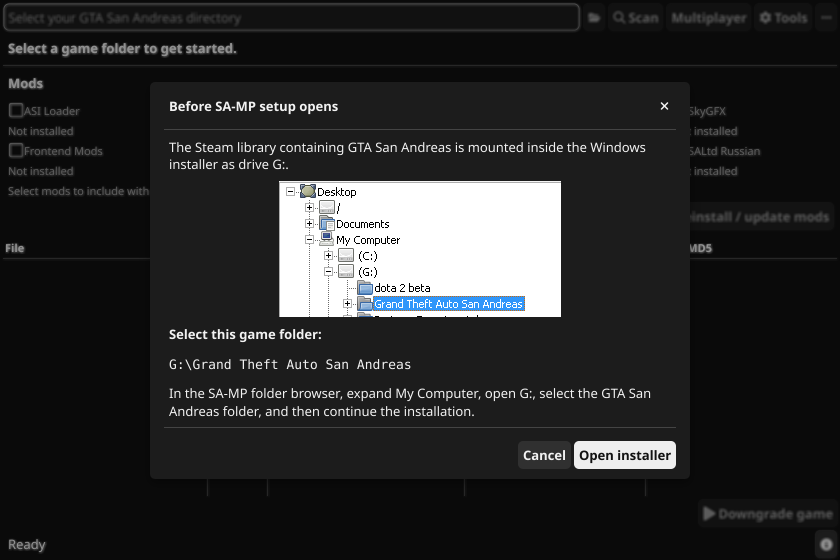
SA-MP has no stable first-party installer link, so the downgrader opens its official successor download page and asks you to select the downloaded installer. Old Windows folder dialogs cannot comfortably browse hidden .steam directories. The app therefore mounts the Steam library as an unused Windows drive such as G:.
The official open.mp interface uses WebView2, which does not run reliably under Wine. The Steam launcher replaces it with a native compact form for server address, nickname, password, and SA-MP client version. open.mp's managed client files are kept in the same Proton prefix and prepared only while the game runs.
Current MTA builds terminate during their integrity check under Wine/Proton before GTA starts. Changing Proton or reinstalling the game does not reliably fix that upstream problem. MTA remains installable, launchable, and removable on native Windows; an existing Linux installation can still be removed from the dialog.
Choose the folder containing the GTA executable, usually steamapps/common/Grand Theft Auto San Andreas. On Linux the system folder chooser can show hidden folders; the app also checks native Steam, Flatpak Steam, extra libraries from libraryfolders.vdf, and a common Steam Deck SD-card path.
Close the game and Steam, check that your account owns the folder, and avoid copying the game into a system directory that requires administrator access. The app must create backups and temporary verified outputs beside the game files.
A previous mod or manual replacement changed it. The app may attempt the patch, but it will never accept an output that does not match the clean target hash. If it fails, restore the file through Steam and scan again.
Make sure the Steam launch option is exactly WINEDLLOVERRIDES="vorbisFile=n,b" %command%. Launch the game from Steam so it uses the expected Proton prefix.
Steam verification probably replaced gta-sa.exe. Open Multiplayer and reinstall the Steam launcher. Its first preserved entrypoint backup remains untouched.
Update to the latest downgrader launcher and reinstall it from Multiplayer. Mod Loader itself is intentionally paused for these clients; compatible selected mods are staged without it. Widescreen Fix is omitted because its current Proton multiplayer build conflicts with GInput or Framerate Vigilante.
Open the log with the information button and export it. Include the log, operating system, game version shown after Scan, and the name of the failed file or client in a GitHub issue. Cancellation waits for the active file operation to reach a safe stopping point.
The process is file-based and deterministic. The app does not inject code into a running game and does not guess whether an output is correct.
Reject empty manifests, unsafe paths, duplicate entries, unsupported actions, and malformed hashes.
MD5 identifies the known source, the clean target, LAA executables, missing files, and local modifications.
Most files are decoded with the bundled xdelta3. The target executable is copied from a complete known asset.
The temporary file must match the target hash from the manifest. A mismatch is a failure and never replaces the installed file.
The first original is backed up, then the verified output is written through a temporary file in the destination directory and renamed into place.
Patch ZIP paths and manifests are validated before a downloaded patch set replaces the cache. A failed replacement rolls the previous cache back. Online builds fetch patches on demand; offline builds embed the same validated patch directory with go:embed and copy it to writable cache on first use.
Application updates are selected by exact platform and online/offline variant. Downloads use staged files and validate expected size plus the published SHA-256 digest before a small helper replaces the executable and restarts it.
The app checks this site's /api/v1/health endpoint instead of probing an unrelated public IP address. Application and Steam launcher updates come through the same first-party Worker, which caches validated published-release metadata and issues version-pinned download URLs. Supported mod metadata uses managed snapshots; large binaries and mod archives remain on their original hosts. A service outage can disable update checks without preventing local scans, tools, or an offline downgrade.
gta_sa.exeThe real downgraded gameScanned, patched, and launched by every mode.gta-sa.exeThe optional Steam menuInstalled at Steam's entrypoint and tracked by SHA-256 ownership metadata.The launcher preserves an existing Steam entrypoint once in .downgrader/launcher-backup. Removal restores only a verified backup and refuses to overwrite a file Steam or another tool changed afterward.
Mod Loader's runtime hooks crash with SA-MP under Proton even when every mod folder is ignored. For SA-MP and open.mp, the launcher temporarily pauses modloader.asi and stages the checked mods directly into the game folder, where Silent ASI Loader can load compatible .asi files. It records the original and staged SHA-256 hashes, waits for the actual gta_sa.exe process, and restores the originals after the game exits.
If the launcher is interrupted, the state file remains and restoration runs before the next game mode. A file changed by another program during play is preserved for manual recovery instead of being overwritten.
On Proton, the launcher copies the chosen managed SA-MP client and shared resources into place, temporarily exposes the selected DLL as samp.dll, and launches open.mp in command-line mode. It watches the new GTA process rather than the short-lived bootstrap process, so cleanup cannot remove a DLL that the running game still uses.
Windows installers run directly. Linux installers run through the exact Proton context Steam configured for AppID 12120. The dedicated drive mapping makes hidden Linux paths visible to old Windows dialogs, and the app writes the expected GTA paths to the prefix Registry so installers can preselect the correct directory.